Are inefficient processes draining your business of time and profit? The question isn't whether you can afford new systems — it's whether you can afford to keep losing money to the ones you have now.
Notion: a codeless revolution in speed, flexibility and cost — automations included.
Off-the-shelf tools make you work their way. Custom development makes you wait, then makes you pay again every time the business changes. Codeless sits in between and beats both.
Docs, projects, records and reporting stop living in separate tools that don't talk to each other.
Status rolls up on its own, so the weekly scramble to assemble a picture of the business disappears.
Process first. The layout follows the way work actually moves through your company.
A short, honest engagement with a fixed shape. You always know what comes next and what it costs.
Thirty minutes on what is slow, manual or invisible in your business today. No deck, no pitch. You leave with a read on whether this is worth doing at all.
We draw how work moves through the company — who hands off what, where it stalls, what nobody owns. Most of the value shows up right here, before anything is built.
Something real in your hands in days, not a specification you have to imagine. You react to the thing itself, and we adjust it while it is still cheap to adjust.
Dashboards, databases and rollups that maintain themselves. Automation is simply part of the work: native Notion triggers, buttons, workers and AI agents take over the repetitive jobs as soon as the structure is in place.
Your team learns to extend the system. Documentation lives inside the workspace it describes, not in a folder nobody opens.
More teams on the system, deeper reporting, new corners of the business brought in — added whenever you want them, at whatever pace suits you.
Project work is quoted as a fixed fee before it starts. If you would rather have steady access to a second pair of eyes, advisory retainers are also an option.
Built on Notion, used by more than 100 million people, then wired to hundreds of high-end tools through native and API integrations.
Ask literally anything. Notion will answer, using your own workspace as the source.
Simple, powerful, beautiful. Next generation notes and documents.
Organize anything, then filter, sort, and connect it however the work demands.
Manage complex projects without the chaos, at whatever level of detail the team needs.
Manage your time and your projects together, in one place.
Buttons, triggers and scheduled work that runs whether or not anyone remembers to do it.

Anything with an open API can plug into your workspace — Slack, Jira, Google, payroll and beyond are just the start.
Four native layers cover almost everything a business asks for — including the work that reaches out to email, calendars, Slack and third-party systems. Automation stays inside Notion unless a particular situation warrants something else.
A property changes, a date arrives, a button is pressed — Notion updates records, moves rows and tells the right person, on its own. Nothing to babysit, nothing extra to pay for.
Notion's own agents work across your workspace and out through everything connected to it — email, calendar, Slack and the rest — so routine work gets done by asking for it in plain language.
Workers react to changes in the workspace, and run on a schedule when that is what the job needs. They also reach third-party tools and keep data fully synchronised between systems.
Agents built around your process: they read, draft, summarise and update, reach out to other systems, and handle the judgement-shaped work that a fixed rule cannot express.
Make is a codeless automation tool that suits certain circumstances. When one of those comes up it is part of the discussion, and I am certified to build it — but it is likely the exception.
The systems behind them have to hold under real pressure, and I spent two decades building exactly those.
“A rare combination of deep technical expertise and a practical, process-first mindset. Jack translates ambiguous or messy requirements into clear, structured workflows — especially for stakeholders like me who don't come from a process engineering background.”
“He helped us design and implement a Notion dashboard that significantly improved visibility across the business, bringing together time management, task and project tracking, and operational information. You're not just building a pretty workspace, but an operating system that supports real execution.”
Six Notion credentials, from partner status down to the Academy track — plus Make certification for any automations where it is preferred.


A codeless automation platform. Certified since the work occasionally calls for one — on the occasions it does, it is part of the discussion.
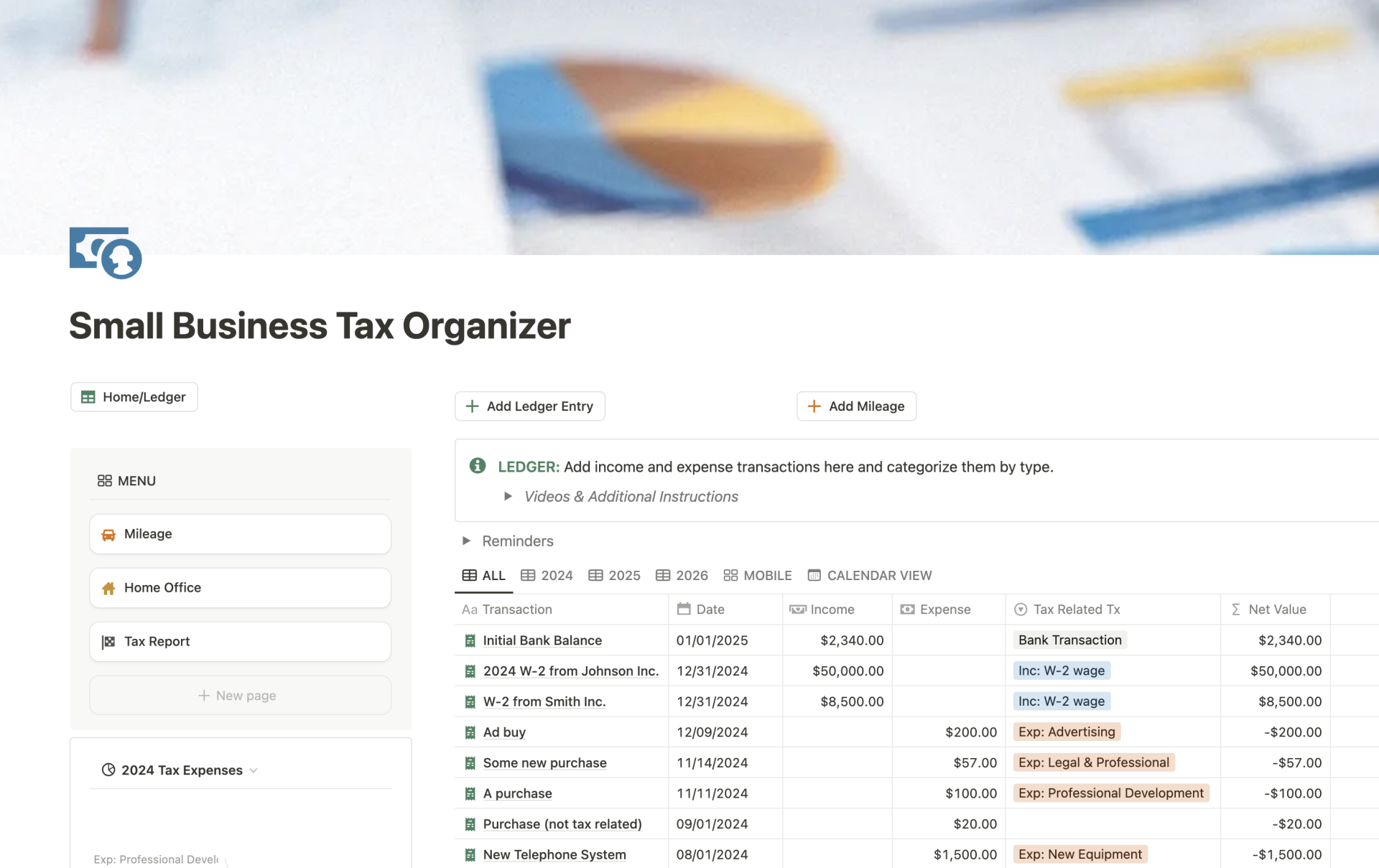
A working Notion template: log a transaction once, tag it, and watch mileage, home office and the year's tax report keep themselves current. Built for the kind of business that dreads April.
Also available on the Notion template gallery — see it there.
Book thirty minutes. No pitch, no pressure — just a plan.
Book a free discovery call